Skip to content
Click for dark modeClick for light mode

Hotels · holiday lets · property for sale

Websites thatshow the inside.Before anyone travels.

The floor plan becomes a flat or a house in 3D, on your own site. We do not come out, there is no camera, and it works for a property that so far exists only on paper.

Send the floor plan — a clear, legible phone photo of the drawing will do.

cziglehome.huLive
A recording of the site plan on cziglehome.hu: the plot turns under the mouse, a click on a house spreads its storeys apart and lists the homes inside it with their prices, then the view returns to the whole site.
Recorded on the live customer site: the site plan of Czigle Home's Agro Lakópark on cziglehome.hu. The same engine runs on this demo.

Veduta — the precise, drawn view of a place seen from above. That is the name of the product, and it is what the floor plan becomes here: a drawn, schematic view — only not as a picture, but as a model you can turn around.

  • 0 visits

    a model needs none

  • 3 languages

    English, Hungarian, German — one site

  • 43 furniture types

    at real sizes, so you know if the bed fits

  • 0 cookies

    no cookie banner by default — the public site sets none on its own

How it is made

A floor plan is enough. The rest happens in your own admin.

The 3D companies scan: that needs a finished property, a visit and a camera. This works from the permit drawing — which is why it can show a flat that has not been built yet, and why nobody has to make an appointment. It is also why the model is light: drawn geometry, not a scanned point cloud a phone has to chew through.
  1. 01

    The plan goes in

    A PDF, a scanned permit drawing, or a clear, legible photo of a sheet of paper — better still if it carries dimensions. In the larger package the AI assistant is at hand for the smaller jobs — it furnishes a room or puts together a garden seating area.

  2. 02

    You finish it

    The drawing sits underneath, scaled; then walls, rooms, doors and windows on top, furnished at real sizes. A double bed really is 1.6 × 2.0 m. The editor is inside your admin, so this is your own work — not a queue at ours.

  3. 03

    It goes on the site

    The visitor turns the house, cuts the walls to half height, walks the storeys. On a phone too.

Honestly: this is a model, not a survey and not a render. It is schematic and for guidance, and may differ from reality and from the finished build; the furniture is real-sized but illustrative. For the size of a property, the sale documentation is what counts — that notice stands under every model, and under every project's site plan too.

Live

A working client site. Open it and turn it.

Czigle Home sells Agro Lakópark — eleven buildings in Balatonfüred, on Lake Balaton — on this engine: the whole plot on one site plan, in 3D, and every home drawn from its own floor plan. This is not a demo: a real developer, a real plot, real prices.
Balatonfüred
Agro Lakópark, Fürdő utca
11 buildings
A to K, on one site plan
2026–2027
handover
cziglehome.huLive
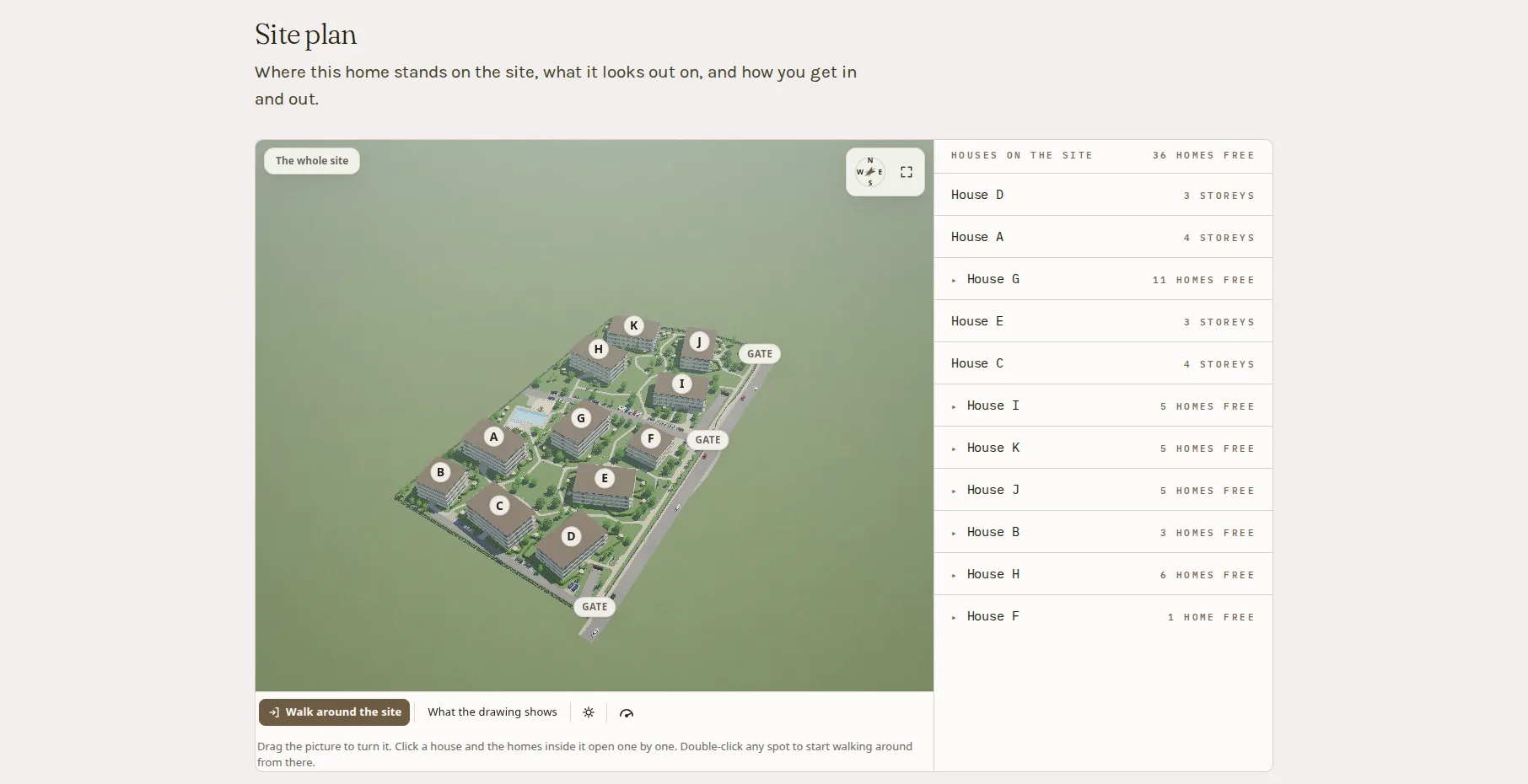
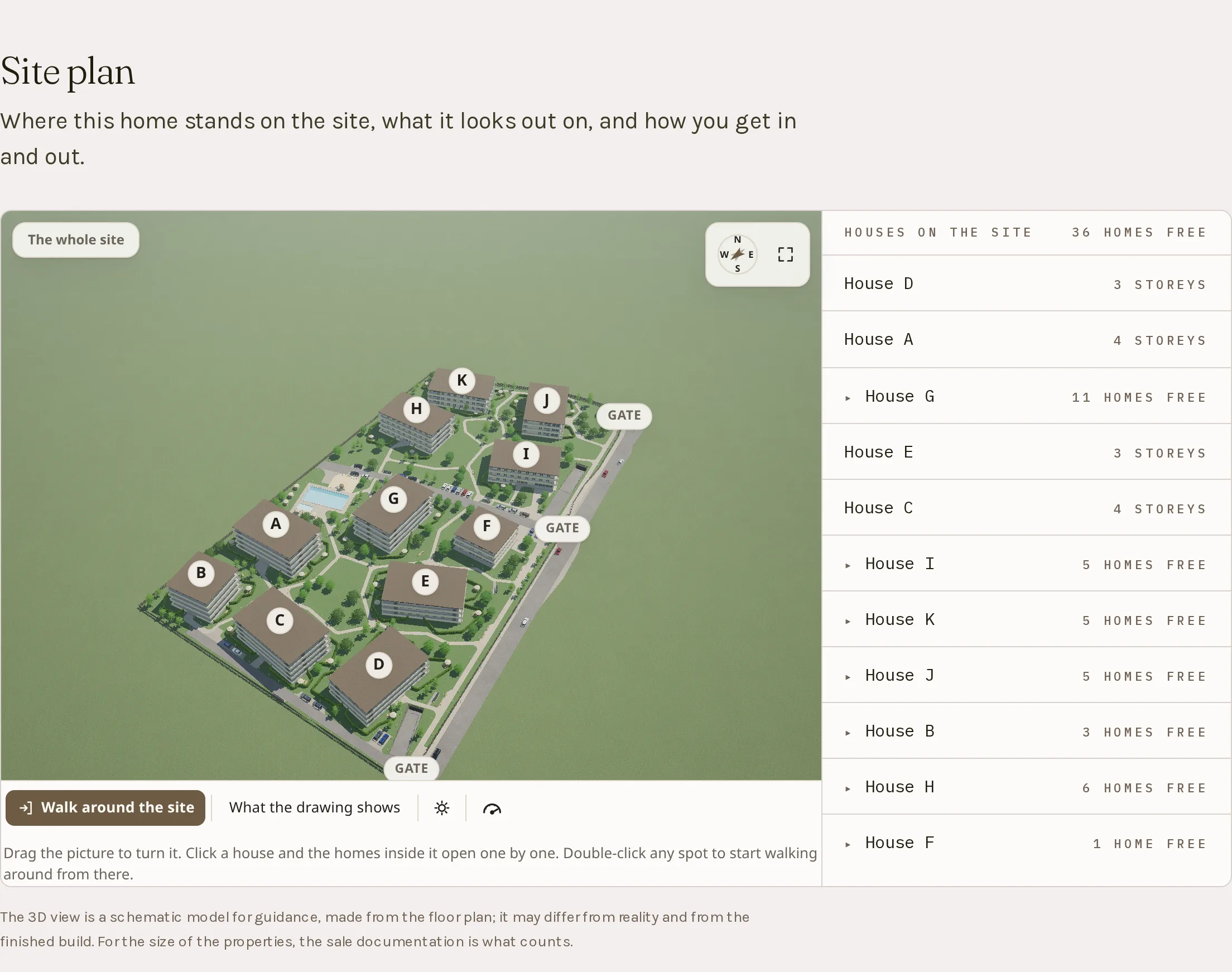
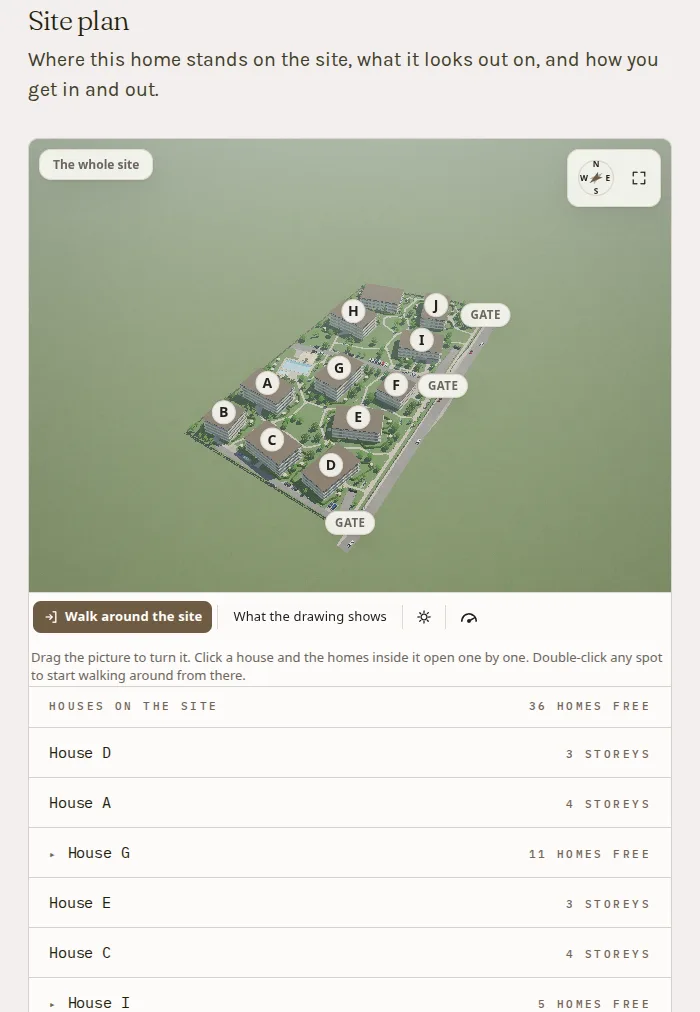
The site-plan section of the Czigle Home project page: the Agro Lakópark in 3D, from above at an angle — eleven buildings lettered A to K on a green plot with the pool, the rows of trees, the two gates and the underground-garage ramp marked — and to the right the list of the houses, each with its number of storeys or its homes for sale. Bottom left the “Walk around the site” and “What the drawing shows” buttons and the day-and-night switch.
The Czigle Home Agro Lakópark on cziglehome.hu, as a buyer sees it: the plot in 3D, eleven houses from A to K, and beside them the list of the houses with their storeys and the homes still for sale. Drag to turn it; click a house and the homes inside it open one by one — every one of them drawn from its own floor plan.
Open cziglehome.hu

Opens in a new tab. The site and its content belong to Czigle Home; the engine, the admin and the editor are the same ones you get.

The 3D walkthrough

The buyer walks the flat — before anyone gets called.

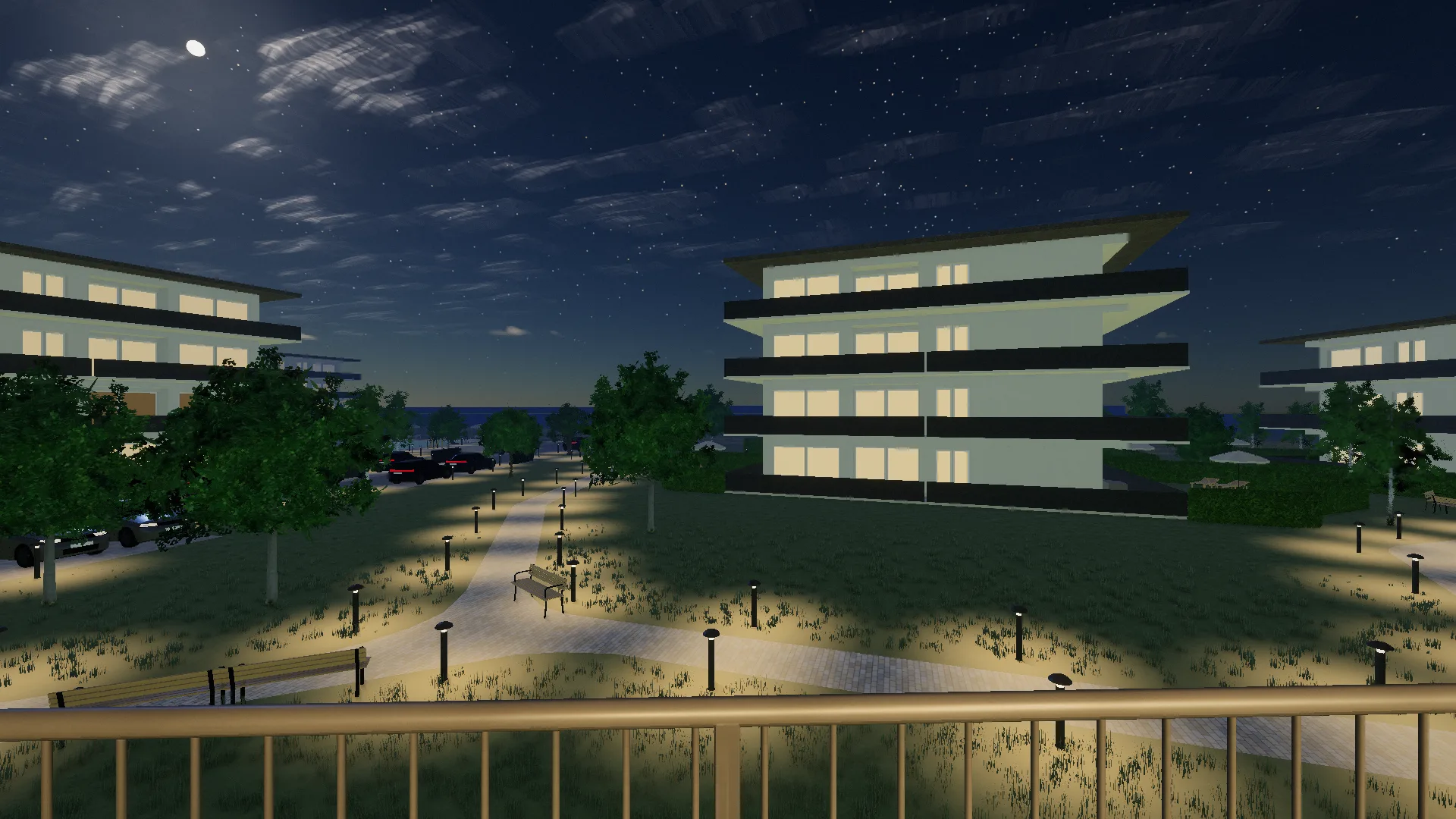
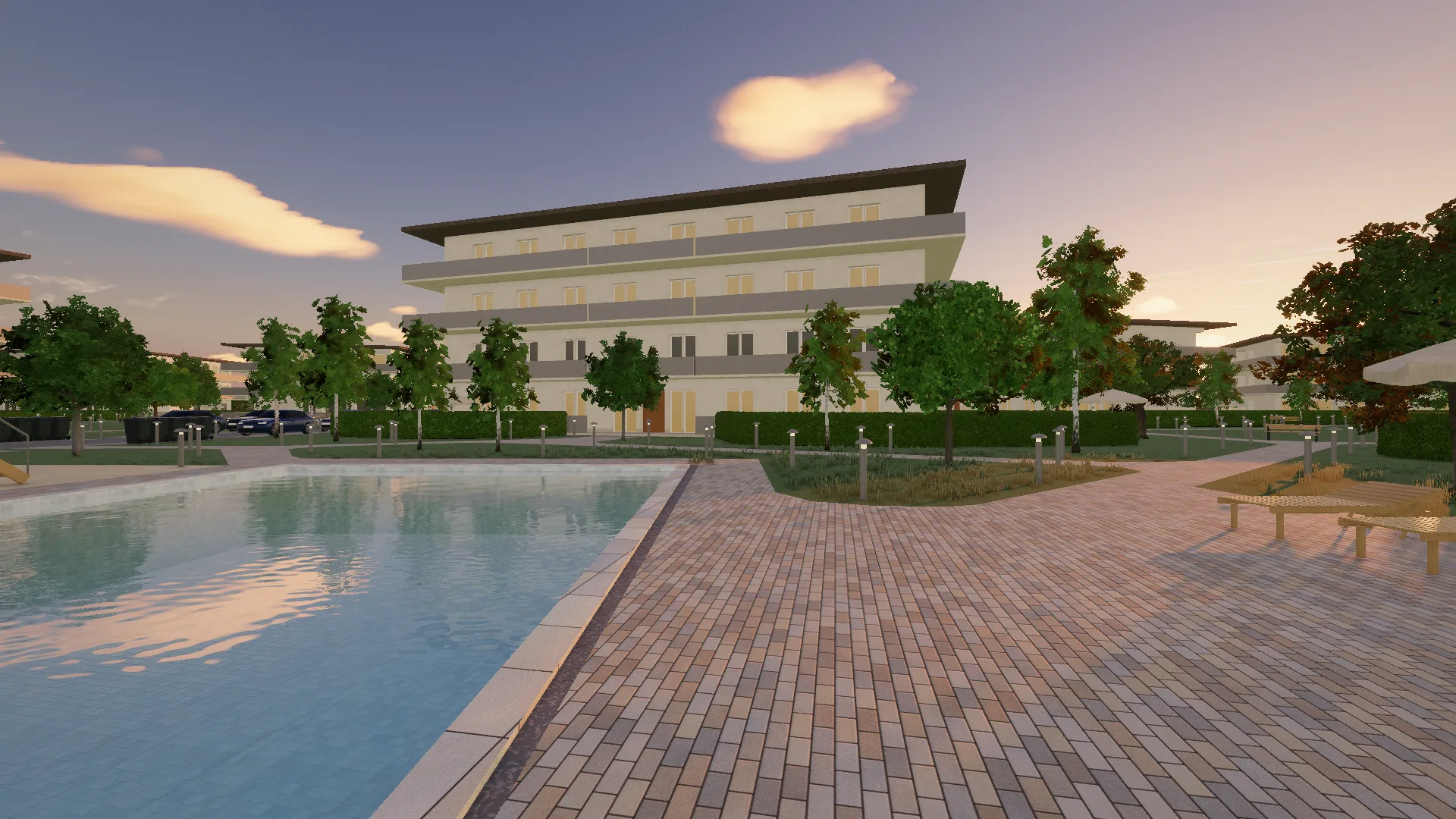
The walkthrough: the buyer steps into the model and walks the flat or the whole scheme. Two recordings from this demo show what they will see on your site: in the first the camera stands on the balcony at one in the morning, looking out for a second and a half — the moon, a meteor, the beacon of a passing airliner — then turns, steps in through the french door and reaches the bedroom in one continuous walk, past the dining table and through the living room and the hall, ending in front of the double bed; in the second it starts on the paving between the two pools, looking along the long edge of the large one, stands for a breath, then walks without stopping, on the pavement all the way, to the nearest building's entrance in the warm evening light.

01

Walking a flat

A 3D walkthrough inside one of the demo's flats at one in the morning: the recording starts out on the balcony, looking out — the moon high on the left, the red beacon of an airliner blinking to its right, a meteor running down below the moon — then the camera turns on the spot, steps in through the French door, and one unbroken walk leads past the dining table, through the living room — past the sofa and the TV — and along the hall into the bedroom, ending in front of the double bed.
Recorded from one of the demo's flats: the walk starts on the balcony under the moon and reaches the bedroom in one breath — no stops. On your own site the buyer steers the walk themselves — mouse, keys or a finger.

02

Walking a site plan

A 3D walkthrough over a site plan: the camera starts on the paving between the two pools, looking along the long edge of the large one, stands for a moment, then walks without stopping on the pavement all the way — past the garden lamps, the hedge and the playground — to the nearest building's entrance, ending in front of its brown front door.
Recorded from one of the demo's site plans: the walk starts between the pools and leads to the nearest building's door. A developer's buyer can walk the whole plot before anything is built.
The walkthrough belongs to Veduta Pro — Essential includes the viewer, not the walk. The walkthrough is also selectable: you decide per property whether the 3D opens with a camera fly-in or straight into the free view. Your visitor steers the walk; the guided tour — the one where the system walks them along the route — belongs to Veduta Pro as well. Both recordings were made on this very demo, from its own drawings: not a render and not an animation, but the same model your buyer will hold on your site.

The application

An estate-agency site with its own admin. The 3D is the part nobody else has.

Not a template with a 3D widget bolted onto it. You get your own instance on your own domain: the public site, the admin your colleagues work in, and the engine that turns a floor plan into a house a buyer can turn around — and, in Pro, walk through.

01

The public site

  • Listings with filters — sale or let, type, town, price, floor area, rooms. The filter lives in the address bar, so a filtered list can be sent to someone and the back button returns to exactly that list.
  • A listing page that opens with the 3D, then the four numbers the decision hangs on: price, m², rooms, plot. Photos, description, fittings, map, and an enquiry form aimed at that one property.
  • New-build projects with a delivery date and a status, so a flat that is not built yet can be published without a price and still collect enquiries — and, in Pro, a development with its site plan drawn shows it in 3D: the plot, the buildings on it, down into a single home.
  • Maps that are drawn, not tiled: roads, water, forest and railway from OpenStreetMap, rendered on the server — the visitor's browser asks nothing of anyone for any of it. And by default the public site sets no cookies at all: the typeface is served from our own server, and statistics and tracking only arrive if you switch on your own Google tag — advertising or measurement — in Pro, so by default there is no cookie banner either: not hidden, just nothing for it to say. With a tag switched on the cookie bar appears, and a cookie of ours remembers the decision — a yes and a no alike — for half a year; Google's own cookies are set only after a yes, and if the visitor says no, nothing goes to Google.
  • Three languages — Hungarian, English, German. Any of them can be switched off, and any of them can sit on the root of your domain.
  • An imprint and a sample privacy notice assembled from the company details you type in — including the estate-agent registration number if you enter it. A template, not legal advice: the final text is yours to answer for.

02

The 3D

  • The model is built from the floor plan: lift the roof off, cut the walls to half height, view the storeys one by one. On a phone as well.
  • A walk-through: the visitor steps into the model and walks the flat or — with a site plan — the whole scheme, using mouse and keys or a finger on a phone. The guided tour — routes, bubbles, auto-start — is Pro on top of the walk. And the light gets an hour: you choose the time of day the model opens at, and the visitor can move it in the viewer. The walk-through and the time of day belong to Veduta Pro.
  • Furnished at real sizes from a library of 43 pieces, so a buyer can see whether the double bed fits and what is left beside it.
  • Floor area per storey, calculated on the server and printed on the data card next to the model.
  • The home page cycles through up to five slides — your properties' plans, and when a development has a site plan, the whole plot as its second slide — on its own clock, with a countdown bar and a pause button. If nothing has a plan drawn, the section does not appear at all: no placeholder, and never somebody else's house.
  • The plan editor is inside your admin, and the plans are yours to draw: in the larger package the AI assistant is at hand for the smaller jobs — it furnishes a room or puts together a garden seating area — but the lines are yours. We do not draw them for you — which is why there is no fee per model and no cap on how many you have.
  • Under every model, in every language, the notice stands: “The 3D view is a schematic model for guidance, made from the floor plan; it may differ from reality and from the finished build. For the size of the properties, the sale documentation is what counts.”

03

The admin

  • Fourteen screens: overview, floor plans, listings, site plans, new-build projects, enquiries, customer chat, messages, settings, users, log, backup, account — in that order, because that is the order of the work — and the News screen, which shows the system's version and what each release brought. Site plans, customer chat and messages belong to Veduta Pro: in Essential they show, disabled, with the package name.
  • Three roles. An owner sees everything and manages people; an editor handles content but cannot reach the settings, the accounts, the log or the backups; a chat agent — in Pro — sees only the customer chat and does not edit listings.
  • It speaks Hungarian, English and German, set per colleague rather than per site — an Austrian owner and a Hungarian receptionist open the same admin in two languages.
  • Your name, your logo and two brand colours; change them and the whole palette moves with them.
  • Enquiries arrive in your inbox and stay with the site as well: the admin lists the latest thousand, and anything older rolls into yearly archive files in the same folder — nothing depends on one person's mailbox, and the system deletes nothing by itself.
  • The whole of your content comes down with one button: “Export your data”, on the Backup screen — listings, plans, photos, enquiries, in a single file, for the owner, whenever they like. What you can take with you at any time cannot be held hostage.
  • Backup at the press of a button: your data goes over to your own Google Drive — the whole site: listings, photos, plans, enquiries, settings — and any backup still kept is restored with one press. It also runs by itself every day, and you decide how many weeks to keep — up to 52, as your storage allows; our own daily server backup runs regardless, keeping the last 7 days. You connect your Google account once; the app sees only its own “Veduta” folder and has no access to the rest of your Drive. User accounts and passwords are not in the backup, so after a restore everyone signs in exactly as before.
  • Nobody types a password for you: every account is opened through a one-time link its owner follows. Disabling someone takes effect on their next click, not when a cookie expires.
What is not in it, said now rather than later: photography and video, logo and brand design, custom development, SEO, ad management and copywriting, raising the AI allowance, and the cost and running of your own services — Google account and Workspace, company mailbox, further domains, property portals. Drawing your floor plans is not included either — that happens in your own admin, where the editor is, and in the larger package the AI assistant helps with the smaller jobs — furnishing a room or a garden seating area. The site plan — the whole scheme in 3D — is a Veduta Pro page: in Essential the editor does not open at all. Putting the listings in is your own work in the admin — as many as you like, at no extra charge; that is ordinary use of the product, and the setup fee does not cover it either: the setup fee pays for finishing the site and taking it live. If you ask us to do it for you, that is separately ordered work: €110 per listing — a flat, a house, a plot, whichever, in either package — and the listing goes up in the languages you have switched on. AI writes the first draft; the English and the Hungarian we comb through by hand, while the German stays the AI's translation, which you can rewrite in the admin at any time. Whatever we put in, you check and approve before it goes live.

What is yours

Your email, your domain, your data. In your name, in your hands.

The site comes to you as a service, but your content is yours: the domain is in your name, you run the email, the backup sits in your own account, and two-step sign-in guards the admin.
  1. 01

    Your own email, run by you

    Company email on your own domain, in your name — not a mailbox we keep for you. You hold the subscription and the password is yours; we set up the domain and the DNS records mail needs (SPF, DKIM, DMARC), and hand them over. From then on you run it yourself, and it stays yours the day you leave.

  2. 02

    Your data stays with you

    The domain is registered in your name from day one. Your content — listings, photos, plans, enquiries — downloads with one button, as the owner, any time, in common file formats: photos in their web-optimised form, 3D models as plan files that need the system to display them. What ties us together is the contract for the running service — not your passwords.

  3. 03

    Backup to your Google Drive

    One press, and your data goes over to your own Google Drive — the whole site, without the accounts. One more, and any backup still kept is restored. It also runs by itself every day, and you decide how many weeks to keep — up to 52, as your storage allows. It sits in your account, not on our server; our own daily server backup runs regardless, keeping the last 7 days.

  4. 04

    Security, built in

    Two-step sign-in on every account, which the owner can make mandatory for the whole office. Passwords of at least twelve characters; sign-in links that work once; and whoever invites someone or grants access confirms it with their own password. The log keeps who did what and when, in order — it cannot be edited or deleted from the admin. And by default the public site sets not a single cookie for your visitors — only if you switch on your own Google tag in Pro, advertising or measurement: from then on there is a cookie bar, and a cookie of ours remembers the decision — a yes and a no alike — for half a year, while Google's own cookies are set only after a yes.

Compared

3D without a fee per model.

In the offers we reviewed, 3D is typically charged per piece or on a separate subscription; here you draw it yourself. Seven points you would compare offers on anyway: for each, what we found on the market and what Veduta gives you.

What 3D costs

3D model

On the market

typically HUF 13,700–50,000 a piece

Priced per piece. In the Hungarian offers reviewed, the basic version for an average flat typically costs HUF 13,700–50,000 (about €39–143) per storey or per property, as published; the lowest price is for registered agents, and some add VAT. Dearer offers exist, and furnished versions or larger properties cost more.

Veduta

€0 per model

€0 per model, no cap on storeys. We draw the first one free; you draw the rest in your admin, in our experience in about two and a half hours each by hand, with the AI assistant helping in Pro. It is a schematic model, not a photographic capture.

Site visit

On the market

typically shot on site, by appointment

3D presentations are typically captured on site (3D scanning or panoramic photography), which needs a finished property and an appointment. Versions modelled from the plans exist too, charged per storey.

Veduta

from the plans, no site visit

It works from the permit drawing: it can show a flat that has not been built yet, and nobody has to make an appointment. The walk-through view inside the model, and the guided tour, are in Pro.

How long it stays online

On the market

6–12 months of hosting

Where the Hungarian 3D studios reviewed state it, hosting for the finished tour runs 6 to 12 months.

Veduta

as long as you subscribe

It stays on your own site for as long as you subscribe; hosting is in the monthly fee.

What the site does

Search in the buyer's own words

Veduta Pro only

On the market

typically from listing text, for a separate fee

The big portals' AI search serves the buyer on the portal, not on your site. The AI search or chat products for an agency's own site that we reviewed, none of them Hungarian, typically work from listing text and fields, without the floor plan, for a separate monthly fee.

Veduta

from the drawing's data too

The visitor asks in their own words (“a south-facing living room, a bathroom off the bedroom”) and is answered from your listings alone, from the drawing's data too: room size, windows, which way they face. 200 visitor questions a month, part of the Pro package.

Languages

On the market

some charge extra per language

Some of the offers reviewed charge extra for another language, for example HUF 90,000 plus VAT per language, or roughly €10–15 a month plus VAT.

Veduta

3 languages, no surcharge

English, Hungarian and German on the public site and in the admin, with the admin language set per colleague. No surcharge.

What you pay, what you keep

What you pay for

On the market

often by headcount or listings

In systems that come with a website, fees often grow with headcount or listings: per user, or in tiers by number of agents or listings.

Veduta

one monthly fee

One monthly fee for the site; it does not depend on how many colleagues work in it or how many listings are up. (You can also order listing entry from us, per listing: that is a service, not a listing fee.)

Your content

On the market

“export”: typically the portal feed

In the offers compared in detail we found no description of downloading your whole content; “export” there typically means the listing feed sent to the portals.

Veduta

download, Drive backup, restore: one button each

As the owner, one button downloads your content (listings, photos, plans, enquiries), one sends it to your own Google Drive, and one restores any backup still kept; it also runs by itself every day. User accounts are in none of them.

What Veduta does not replace: a CRM for client records and matching, and automatic listing export to the portals. If you use those today, Veduta sits beside them, not instead of them.

Basis: the offers of 175 providers (published prices where available), reviewed in September 2026, with capabilities compared in detail across ten key offers. Prices are as published, forint converted at about HUF 350 to the euro; a VAT-registered business should compare net prices with our current VAT-free totals.

Price

No setup fee, or paid up front. Both prices printed.

This one is not a project that ends — it is a site that runs on a server we keep, so it is priced the way it actually works. The general web packages are on the maker's site, the huszak.dev front page; this page is only about the estate-agency product.

Prices are net, in euros. VAT-exempt under the Hungarian small-business scheme: today our invoice carries no VAT on the setup fee or the monthly fee. A business outside Hungary may owe VAT in its own country under the reverse charge; that is not included. This page is for information: prices and terms are set by the written contract, which prevails.

Veduta Essential

An estate agent, a guesthouse, a holiday let, or an owner with a handful of properties to move.

No setup fee

€179/ month

Setup: €0

On a 24-month term, payable in full.

Paid up front

€129/ month

Setup: €1,030

One-off setup. No fixed term: the monthly part can be cancelled with 30 days' notice at any time.

Delivery
10 working days, counted from when all material and access have arrived (on the paid-up-front route, the setup fee too), then a 10-working-day test period

Includes

  • Your own site on your own domain, in your colours — we build it, finish it and take it live: that is the setup. After that you put the listings in yourself in the admin, as many as you like, at no extra charge
  • The admin is yours: listings, photos, text, floor plans, colleagues — none of it waits on us
  • Floor plan into a 3D model, as many as you draw: no fee per model, no cap on storeys. The first one we draw for you, free, before anything is signed
  • Your buyer turns the flat around on their phone and lifts the storeys off one by one — no visit, no camera
  • Server, domain, SSL, daily backups, email sending up to 10,000 emails a month: ours to run
  • For company email we set up the mail DNS records (SPF, DKIM, DMARC); you subscribe to the mailbox in your own name, so it stays yours the day you leave
  • Security and platform updates for as long as you are with us
  • If something we built breaks, the fix is part of the monthly fee: we respond to a critical fault and start on it within one working day, and to other faults within 1–5 working days, as the contract's fault table sets out
  • A question, or stuck? Email us — within reasonable limits it is part of the monthly fee, and we reply within 3 working days. Anything that is really doing the work for you, or repeat training, we flag in advance and do only when ordered, at the hourly rate
  • Project page: delivery date, status per flat, and flats published without a price while they are only collecting interest
  • Your content downloads with one button, any time — listings, photos, plans, enquiries, in a single bundle
  • Backup to your own Google Drive: one press sends the whole site over, and any backup still kept comes back with one button — it also runs by itself every day, and you decide how many weeks to keep, up to 52
Get a free model

Veduta Pro

For a developer selling flats that are still on paper. The permit drawings become flat types a buyer can walk through: not a render and not an AI image, but a drawing made in the site's own editor — you decide which lines stay.

No setup fee

€219/ month

Setup: €0

On a 24-month term, payable in full.

Paid up front

€159/ month

Setup: €1,400

One-off setup. No fixed term: the monthly part can be cancelled with 30 days' notice at any time.

Delivery
20 working days, counted from when all material and access have arrived (on the paid-up-front route, the setup fee too), then a 10-working-day test period

Everything in Veduta Essential is in here too.

Includes

  • PREMIUM 3D LIBRARY: 96 finished pieces to furnish with (sofas, armchairs, beds, kitchens, bathrooms, lamps, terrace furniture, potted plants), 14 premium floors in six kinds of marble and eight colours of epoxy, and for the site plan's garden 24 plants (trees, shrubs, perennials) and four kinds of hedge. Only in this package
  • THE SITE PLAN: the whole scheme in 3D — the plot, the buildings on it, down to a single flat. Yours to draw, yours to rearrange. Only in this package
  • THE WALK-THROUGH: your buyer steps into the model and walks the flat or the whole scheme. They are not looking at pictures — they were there. Only in this package
  • THE GUIDED 3D TOUR: along the route you draw on the floor plan, the system walks your buyer through — at an even pace, around smooth corners, with the view yours to set: at the viewpoints you place along the route you choose where the camera looks, and notes can pop up in bubbles along the way. You write them in all three languages and the visitor gets their own; what you have not written in their language simply does not appear. Several routes can play one after another; per property you can make the 3D open with the tour, and a “Show me around” button starts it from the outside view. The guided tour is only in this package.
  • “Where does this flat stand?” — one button on the listing, and the scheme opens with THAT home marked on it
  • TIME OF DAY: noon, evening, or the whole day on a slider — the visitor decides. A garden with its lamps lit sells something different from the same one at midday
  • SIXTEEN PREMIUM THEMES: seven places, each in a daylight and an evening version, plus two newer ones — the sea from above and the stone square at night — with footage moving behind the page. Your site stops being a template and becomes a PLACE
  • AI ASSISTANT FOR YOUR OFFICE: translates between the languages you have switched on, drafts listing text from your own facts, and is at hand for the smaller jobs — it furnishes a room or puts together a garden seating area. Every suggestion is a draft you check and approve — and every decision stays yours
  • AI RECOMMENDER FOR YOUR BUYER: the visitor searches in their own words (“a house with a garden, up to sixty million”) and is answered from YOUR listings alone
  • AND IT READS THE DRAWING: how big each room is, how many windows it has, which way they face, what stands in it. It answers what no filter can — “a bathroom off the bedroom”, “a south-facing living room with plenty of windows”
  • VOICE INPUT: instead of typing, your buyer can SAY the question — the browser writes their words into the field in the language of the page, they correct it, and send. The answer always comes back in writing. Where the browser cannot do this, the microphone is not shown and they type
  • LIVE CHAT WITH A PERSON TAKING OVER: one button on the panel — if one of your colleagues is on duty in the admin, they carry on the same conversation; if not, the visitor asks for a reply by email and it lands with your enquiries. Your own team staffs the chat
  • AI ALLOWANCE: 500 operations a month for your office and 200 visitor questions for the recommender. The count sits in your settings and starts again each month. CAN BE RAISED — for an extra fee, agreed in writing in advance, for a set period
  • POP-UP MESSAGE: a notice or an offer for arriving visitors — across the site or only on the properties you choose, once per visit
  • GOOGLE TAG, ADVERTISING OR MEASUREMENT: if you run Google ads, the site measures how many buyers came from them and how many asked for an offer, and Google can reach again the people who have already visited you; if you would rather measure visits, a Google Analytics measurement ID goes in the same place — this is the one case where a cookie bar appears on your site: yes and no are the same size button, the tag loads only after a yes, and until the visitor says yes nothing goes to Google; a cookie of ours remembers the decision — a yes and a no alike — for half a year, and they can change it at any time from the footer. You paste the tag ID in your settings and the rest is the product's job — setting up your ad or measurement account and your privacy notice stay yours
  • BACKUP TO YOUR GOOGLE DRIVE: one press sends the whole scheme over — every plan, every home, the site plans, the photos, the enquiries, the settings — and any backup still kept comes back with one button. It also runs by itself every day. In both packages
Get a free model

One way to measure the price before you move on. An agent's commission is typically 3–4% of the sale price plus VAT. Work that out on one average sale of your own and put this list beside it: two full years of Veduta Pro — setup, monthly fee, everything, to the twenty-fourth month — land in the same order of magnitude, and Essential lower still.* For a developer the same sum is a few per cent of a single flat. We are not promising that the site will sell anything for you. We are saying one thing only: measure this price against a deal, not against a monthly bill.

* Market orders of magnitude, not your figures: commission rates differ from office to office and from deal to deal, and what a sale is worth to you depends on your own prices. We do not promise or warrant sales — the website is a tool, the business is yours.

Veduta

Honestly, about the AI assistant in Veduta Pro: it is the youngest part of this product. There is AI working inside it, and AI gets things wrong — it misreads a line on a drawing, drops a dimension, mistranslates a sentence, and the AI recommender your visitors talk to can answer inaccurately too. That is why the AI assistant publishes nothing by itself: every suggestion it makes is a draft a person reads and a person approves, and whoever puts something out on the site is the one answering for it. The AI recommender's answers, on the other hand, go straight to the visitor without approval, marked as AI. The price and the figures are always what the listing page says — the same sentence sits inside the product too, under the AI recommender. What this feature promises is faster work, not faultless operation: we do not warrant that any AI answer, translation, draft or suggestion is correct, complete or fit for your purpose, or that the feature is available without interruption.

The AI allowance on the Pro card (500 office operations and 200 visitor questions a month) is two separate monthly caps. If the 200 visitor questions run out, the AI recommender stops until the month turns. The contact form, the phone number, the listings and the 3D keep working throughout. If the 500 office operations run out, the AI assistant in the admin pauses until the month turns. We raise a cap on request, on terms agreed in advance; until the increase is set up, the pause applies. Which AI model runs behind it is our choice, and we may change it: the features on the card stay, and if the processing provider changes, we tell you in writing at least 15 days in advance, and you may object to the change.

The drawing is yours to do: the editor is inside your admin, and in my experience a model is about two and a half hours of work by hand — in Veduta Pro the AI assistant helps with the smaller jobs, furnishing a room or a garden seating area. There is no fee per model and no cap on storeys: you have as many models as you draw. What we do not take on is a drawing service. We do not keep drawing capacity for putting your plans in, and that is why no number for it appears on this price list.

Both routes lead to the same package. With no setup fee, Essential is €179 a month and Pro €219, and the 24 months you commit to are payable in full. Paid up front, there is a one-off setup fee, and after that the monthly fee is €129 for Essential and €159 for Pro, whose monthly fee also covers the AI and the live chat — and there is no fixed term: the monthly part can be cancelled with 30 days' notice at any time. Over twenty-four months the two routes cost about the same: the setup fee is a little less than what you save in monthly fees over that time.

If our exemption ends (for example because we cross the threshold or the law changes), VAT at the statutory rate is added from then on, as the contract sets out.

In total

Essential, no setup fee

Setup
€0
Monthly
€179
First year
€2,148
24 months
€4,296

Essential, paid up front

Setup
€1,030
Monthly
€129
First year
€2,578
24 months
€4,126

Pro, no setup fee

Setup
€0
Monthly
€219
First year
€2,628
24 months
€5,256

Pro, paid up front

Setup
€1,400
Monthly
€159
First year
€3,308
24 months
€5,216

The full amount payable, not annualised. Over twenty-four months the two routes land within a few per cent of each other — what differs is when you pay. On the paid-up-front rows the 24-month column is a comparison, not a commitment: that route carries no fixed term, and the monthly part can be cancelled with 30 days' notice. On the paid-up-front route the monthly fee may rise, starting 12 months after go-live, at most once per calendar year and by no more than the annual consumer price index published by the Hungarian Central Statistical Office, so that route's 24-month figure is worked out at today's fee. On the no-setup-fee route the monthly fee does not rise during the 24 months you commit to.

Custom work under a separate quote: a hotel booking engine, a connection into a system you already run, a custom feature — these are not part of the package but separate work. Get in touch: write below what you need, we look at whether we can take it on, and if we can, you get a price for it.

Ownership and your data

Your content stays in your hands throughout.

  • On the no-setup-fee route, the 24 months you commit to are payable in full. On the paid-up-front route there is no fixed term: the monthly part can be cancelled with 30 days' notice at any time. Every other term is set out in the written contract.
  • The domain is in your name from day one, even when we handle the registration. If it sits in our registrar account, we hand over the access needed to manage it within 5 working days of a written request; when the contract ends, we transfer it wherever you ask, or hand over the access, within 15 days.
  • Whatever you put in, you can download whenever you like: the admin has an “Export your data” button — listings, photos (in their web-optimised form), floor plans, enquiries, as ordinary files in a single bundle, for the owner. You do not have to ask us for it, and you do not have to wait for anything.
  • The backup is yours: one press puts the whole site into your own Google Drive — it also runs by itself every day, and you decide how many weeks to keep, up to 52 — and any backup still kept is restored from the admin with one button. It sits in your account, not on our server, so it is there even if something happens to our server; ours, the server's daily backup, encrypted and kept off the machine as well, keeps the last 7 days regardless. Accounts and passwords belong to the installation and stay there, so after a restore everyone signs in exactly as before.
  • The plan files are your own drawings, and they are in that bundle too — so they stay with you just the same. Only the system can display them in 3D, though.
  • The application itself is rented, not sold: it runs as a service for as long as you subscribe — the code stays ours, and there is no buy-out option. What is yours is your content and your plan files.
  • Your contract is with Richárd János Huszák, sole trader, based in Veszprém — the details are on the huszak.dev imprint, and there is nobody else behind it.

The general web packages on huszak.dev

Where it works

The model is a web address. It goes where your buyer is.

  • Yes: Your own site

    This is where the model lives, and the only place it is whole: turned, cut open, and in Pro walked through, under your own name. Enquiries land directly with you too — no portal in between, and no commission on top.

  • Yes: ingatlan.com

    The listing editor has a “Virtual tour” field, and the model is an ordinary web address, so it drops straight in. There is no charge for the field itself, but it comes with one of the portal's photo packages — worth checking with them first.

  • Yes: Airbnb, Booking, Vrbo

    Twenty photos make it hard to piece together how big a space is and what sits next to what — these platforms show no floor plan and allow no links out: their rules exist precisely so a booking can't leave their system. Which is why the model lives on your own site — a guest who wants to see the space before booking comes to you, and their question reaches you directly, with no commission.

  • Yes: Facebook, email, print

    One link to the property's page — the model is already on it. On paper, a QR code.

Proof

Not a screenshot. Go and turn it.

This site is the demo itself: a complete, working estate-agency site — the same engine, the same models. Go over to the listings and turn one yourself.
Honestly: the agency is invented, and so is most of the offer — so that you can open and change anything on it without clicking around on a real client's site. Agro Lakópark, however, is real: Czigle Home's development under construction, shown here with their consent, with the current prices on their own site. The same engine runs live, on cziglehome.hu.

Contact

Send us a floor plan.

On weekdays we reply within 48 hours. Email us a photo of the plan (a phone photo is fine): we tell you what can be made of it and, if the drawing is suitable, when we can show it to you in 3D. If we do, that is your first model, free, before any contract.

Email a floor plan

The site ships in English, Hungarian and German. Around Balaton the second-home buyer is often Austrian or German, and the listing in their own language is the one that actually gets read.

Phone
+36 30 637 3903Prefer to talk? Call. We answer our own phone.
Based in
Veszprém, Hungary — working remotely, wherever you are